How to change the network mode on my Samsung smartphone
Step 1 of 7
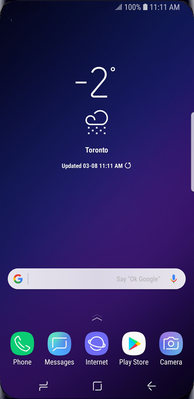
Swipe up or down to view the apps.

Step 2 of 7
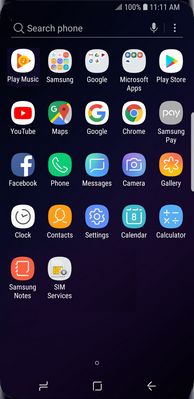
Touch Settings.

Step 3 of 7
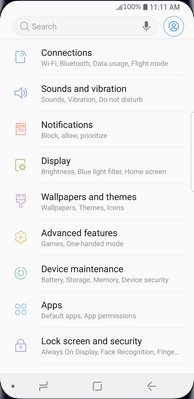
Touch Connections.
Step 4 of 7
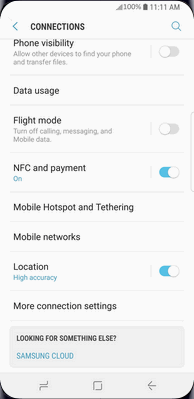
Touch Mobile networks.
Step 5 of 7
Touch Network mode.
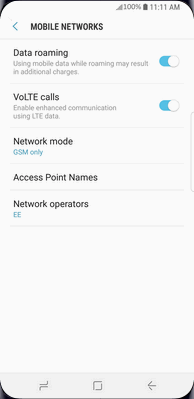

Step 6 of 7
Touch the desired option, e.g., LTE/WCDMA/GSM (auto connect).
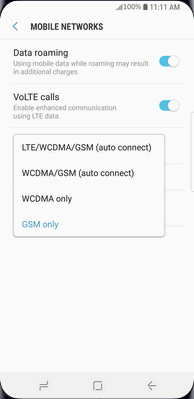
Step 7 of 7
The network mode has been changed.
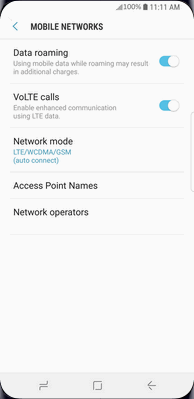

- Swipe up or down to view the apps.
- Touch Settings.
- Touch Connections.
- Touch Mobile networks.
- Touch Network mode.
- Touch the desired option, e.g., LTE/WCDMA/GSM (auto connect).
- The network mode has been changed.
Applicable to:
Samsung Galaxy S series (S22 and higher), A series (A03s and higher), Z Flip series (5 and higher), Z Fold series (5 and higher), FE (S22 and higher) series.