How to manage mobile data settings on my Google Pixel and Samsung XCover7 Pro
- Swipe up to view the apps.
- Touch Settings.
- Touch Network & Internet.
-
Touch SIMs.
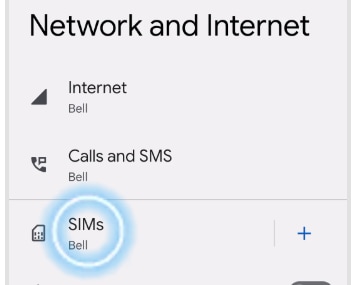
Images may not be exactly as shown.
- Touch Roaming to change the setting (e.g., from off to on).
- Read the warning and touch OK.
- Data roaming is now on. Touch Roaming again to turn it off.
-
To switch data off completely, touch the Mobile data slider
to turn it off.
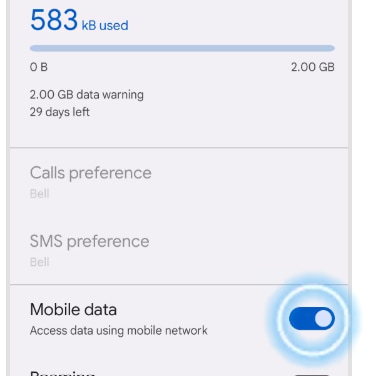
Images may not be exactly as shown.
- Data services are now off. Touch Mobile data again to turn data services on.
- Swipe up to view the apps.
- Touch Settings.
- Touch Network & Internet.
- Touch SIM.
-
Touch Data warning & limit.
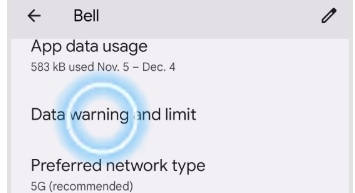
Images may not be exactly as shown.
- Touch Mobile data usage cycle.
- Scroll to the desired date.
- Touch Set.
- Touch the Set data warning slider to turn it on.
-
Touch Data warning.
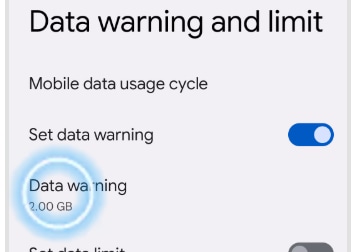
Images may not be exactly as shown.
- Enter the desired data usage warning. Touch Set.
- Touch the Set data limit slider to turn it on.
- Touch OK.
-
Touch Data limit.
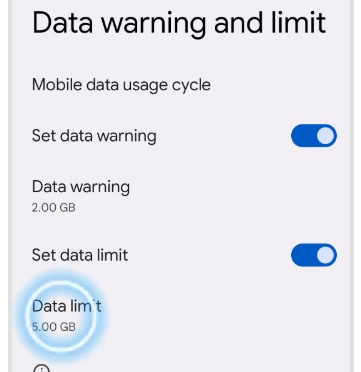
Images may not be exactly as shown.
- Enter the desired data usage limit. Touch Set.
- The changes have been saved.
Applicable to:
Google Pixel 6, Pixel 6 Pro, Pixel 7, Pixel 7 Pro, Pixel 7a, Google Pixel 8, Google Pixel 8 Pro, Samsung XCover7 Pro.
Join the conversation in our community forums
Find even more support by searching topics or posting questions in our forum.
Visit our community
Join the conversation by scanning the QR code.


Join the conversation in our community forums
Find even more support by searching topics or posting questions in our forum.
Visit our community
Join the conversation by scanning the QR code.