I’m having trouble connecting to the Internet using my Connection Hub
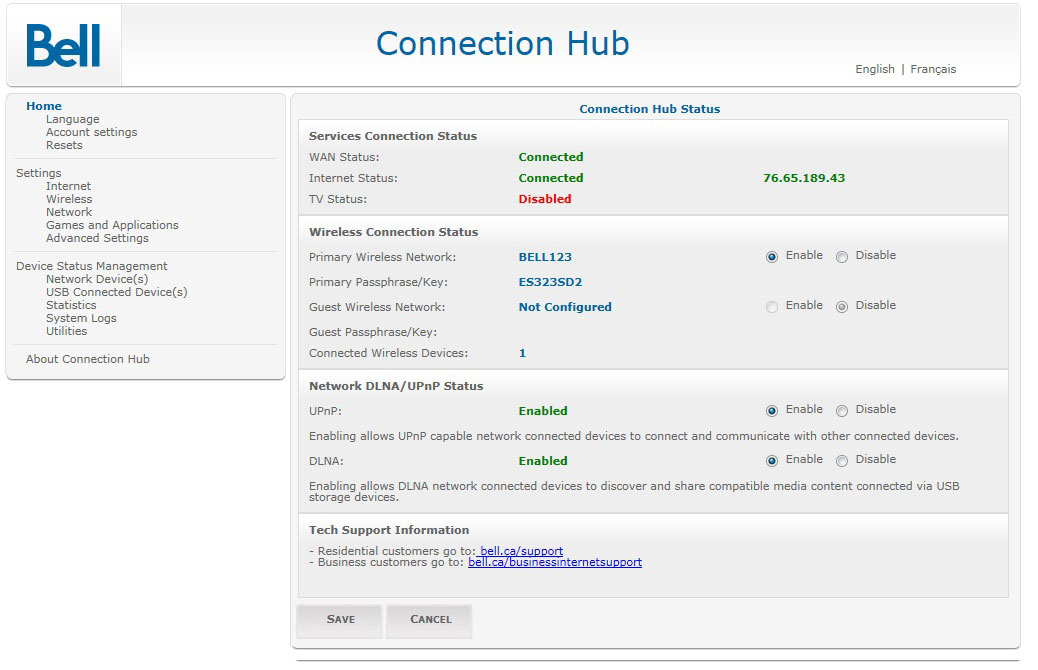
Check if your Connection Hub is connected to the Internet
- Open your web browser.
- Type http://192.168.2.1 in the address bar and press Enter.
- If prompted, enter your username and password. If you haven’t changed the admin username and password to something more secure, enter the defaults:
Username: admin
Password: admin - In the Services Connection Status section of the screen:
- WAN Status should say Connected.
- Internet Status should say Connected.
- TV Status is related to Bell Fibe™ TV and does not affect your Internet connection
One of my computers/devices can’t connect to the Internet, but all the others can
- Try restarting your Connection Hub. Unplug it and wait 10 seconds before plugging it back in.
- If the computer/device is connected wirelessly, see I’m having problems with my Connection Hub wireless connection.
- Make sure that all cables are plugged in firmly and correctly. See How to set up my Connection Hub if you’re not sure.
- Reboot your computer/device; this may solve your connection problem.
- Third-party security software may be impeding your Internet connection. Try disabling the software and surfing again.
- If none of these steps solve the problem, contact us for further assistance.
None of my computers/devices can connect to the Internet
- Try restarting your Connection Hub. Unplug it and wait 10 seconds before plugging it back in.
- If the computer/device is connected wirelessly, see I’m having problems with my Connection Hub wireless connection.
- If the power light
 is flashing red, a software upgrade is occurring on the Connection Hub and should finish within 10-15 minutes.
 - If the Internet light is red, you may have changed your Bell Internet password recently and have not yet updated the Connection Hub settings; follow the instructions in How to update my Bell Internet user ID and password.
- If the WAN light
 is off, your Connection Hub may not be connected properly to the Bell Internet network. See How to set up my Connection Hub for more information.
 - If none of these steps solve the problem, contact us for further assistance.
Internet connection is slow
- Try restarting your Connection Hub. Unplug it and wait 10 seconds before plugging it back in. You should always try this as a first step before calling for technical support.
- If the computer/device is connected wirelessly, see I’m having problems with my Connection Hub wireless connection.
- Some computer viruses or Trojans can slow down your Internet connection. Be sure to scan your computer regularly with up-to-date security software.
- If none of these steps solve the problem, contact us for further assistance.