How to connect devices to the Wi-Fi network on my Home Hub 4000/Giga Hub/Giga Hub 2.0 using WPS
Steps to follow:
- Turn on your computer or Wi-Fi device.
-
Press the down arrow and scroll down to Connect Wi-Fi devices (WPS).
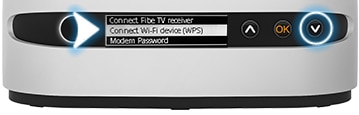
Images may not be exactly as shown.
-
Press the OK button.
-
You have two minutes to connect your Wi-Fi device. If you do not make it in time, you'll need to start over.
-
Press and hold the WPS button on your computer or Wi-Fi device for 5 seconds. Your Wi-Fi password will automatically be entered and the device will connect to the network.

Images may not be exactly as shown.


Join the conversation in our community forums
Find even more support by searching topics or posting questions in our forum.
 Join the conversation by scanning the QR code.