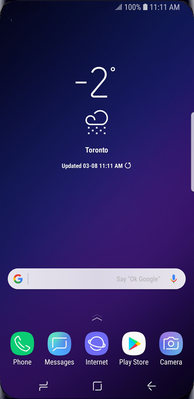
1. Touch Apps.
When abroad, data roaming is required to use email, web browsing and other data services. Please note that data roaming charges will apply.
To avoid unwanted roaming charges, you can turn off data roaming. You can also turn off data services altogether. This way, your Samsung Galaxy S III will only transmit data over Wi-Fi.
Last Updated:21/05/2013
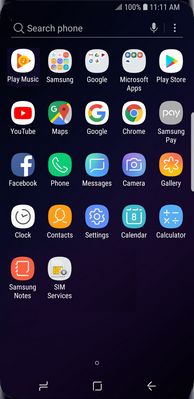
2. Scroll to and touch Settings.
When abroad, data roaming is required to use email, web browsing and other data services. Please note that data roaming charges will apply.
To avoid unwanted roaming charges, you can turn off data roaming. You can also turn off data services altogether. This way, your Samsung Galaxy S III will only transmit data over Wi-Fi.
Last Updated:21/05/2013
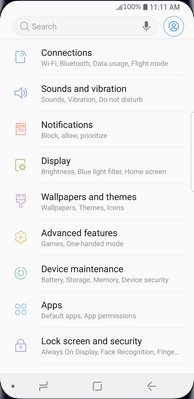
3. Touch More settings.
When abroad, data roaming is required to use email, web browsing and other data services. Please note that data roaming charges will apply.
To avoid unwanted roaming charges, you can turn off data roaming. You can also turn off data services altogether. This way, your Samsung Galaxy S III will only transmit data over Wi-Fi.
Last Updated:21/05/2013
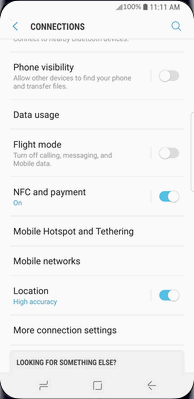
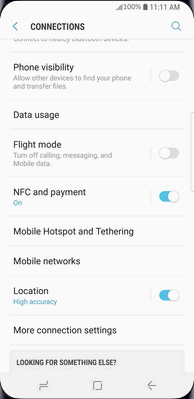
4. Scroll to and touch Mobile networks.
When abroad, data roaming is required to use email, web browsing and other data services. Please note that data roaming charges will apply.
To avoid unwanted roaming charges, you can turn off data roaming. You can also turn off data services altogether. This way, your Samsung Galaxy S III will only transmit data over Wi-Fi.
Last Updated:21/05/2013
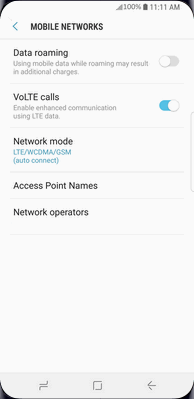
5. Touch Data roaming.
When abroad, data roaming is required to use email, web browsing and other data services. Please note that data roaming charges will apply.
To avoid unwanted roaming charges, you can turn off data roaming. You can also turn off data services altogether. This way, your Samsung Galaxy S III will only transmit data over Wi-Fi.
Last Updated:21/05/2013
6. Read the warning and touch OK.
When abroad, data roaming is required to use email, web browsing and other data services. Please note that data roaming charges will apply.
To avoid unwanted roaming charges, you can turn off data roaming. You can also turn off data services altogether. This way, your Samsung Galaxy S III will only transmit data over Wi-Fi.
Last Updated:21/05/2013
7. Data roaming is turned on.
Touch Data roaming again to turn it off.
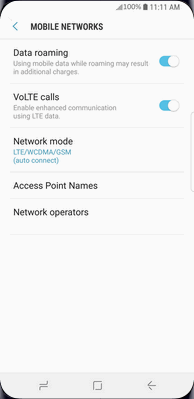
When abroad, data roaming is required to use email, web browsing and other data services. Please note that data roaming charges will apply.
To avoid unwanted roaming charges, you can turn off data roaming. You can also turn off data services altogether. This way, your Samsung Galaxy S III will only transmit data over Wi-Fi.
Last Updated:21/05/2013
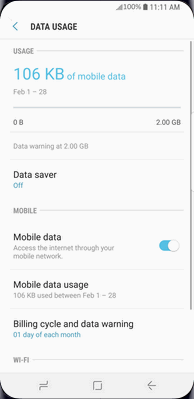
8. To switch the network off completely, touch Use packet data.
When abroad, data roaming is required to use email, web browsing and other data services. Please note that data roaming charges will apply.
To avoid unwanted roaming charges, you can turn off data roaming. You can also turn off data services altogether. This way, your Samsung Galaxy S III will only transmit data over Wi-Fi.
Last Updated:21/05/2013
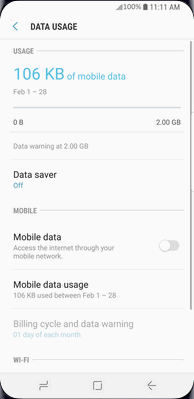
9. Data services are now off.
Touch Use packet data again to turn data services on.
When abroad, data roaming is required to use email, web browsing and other data services. Please note that data roaming charges will apply.
To avoid unwanted roaming charges, you can turn off data roaming. You can also turn off data services altogether. This way, your Samsung Galaxy S III will only transmit data over Wi-Fi.
Last Updated:21/05/2013