How to set up my Connection Hub
Which Internet service do you have?
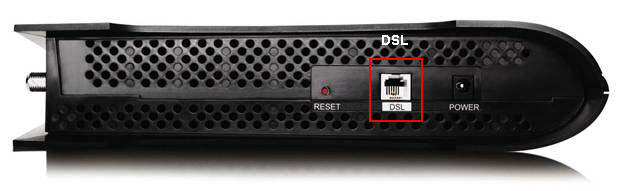
Bell Fibe™ Internet service connects to a phone jack with a phone cable. The phone cable connects to the DSL port underneath the modem.
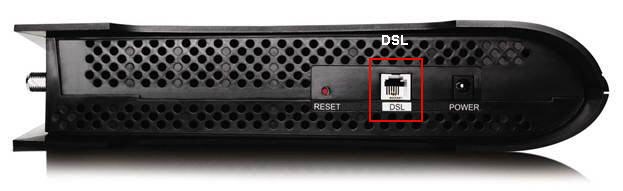
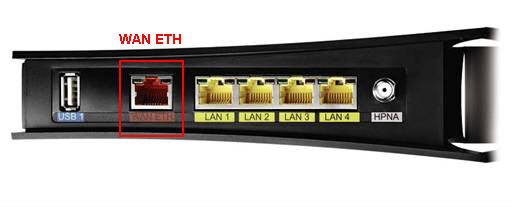
Fibre-to-the-home Internet service (FTTH) connects with an Ethernet cable to a large Optical Network Terminal (ONT) installed in your home. The Ethernet cable connects to the WAN ETH port in the back of the modem.
For best performance, use the cables supplied in your Bell Internet Installation Kit.
Connect your modem – Bell Fibe™ Internet service
- Plug one end of the phone cable into the DSL port underneath the modem.
- Plug the other end directly into an unfiltered phone jack or into one side of a phone splitter, if a Bell technician has installed one for you. The splitter looks like a regular phone jack.
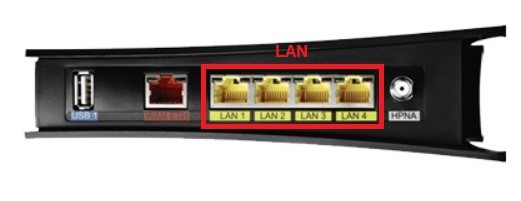
- Connect one end of the Ethernet cable into any yellow Ethernet port (LAN) on the
- Connect the other end of the Ethernet cable into your computer’s Ethernet port.
- Connect one end of the power adapter to the modem.
- Connect the other end of the power adapter into a wall socket.
Connect your modem – Fibre-to-the-home Internet service (FTTH)
- Connect one end of an Ethernet cable into the Optical Network Terminal (ONT).
- Connect the other end into the red WAN ETH port on the back of the modem.
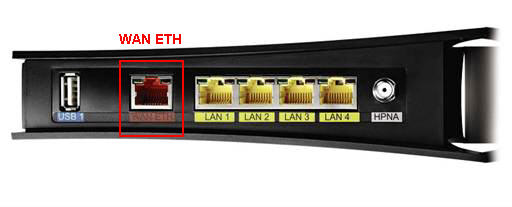
- Connect one end of another Ethernet cable into any yellow Ethernet port (LAN) on the back of the modem.
- Connect the other end into your computer’s Ethernet port.
- Connect the other end of the Ethernet cable into your computer’s Ethernet port.
- Connect the other end of the power adapter into a wall socket.
Confirm that your modem is working properly
The lights on your modem indicate whether it’s working properly or not. Below is a picture of a modem that’s working correctly.
If your modem doesn’t appear to be working correctly, try to visit a website, such as bell.ca. If you cannot connect, follow these steps:
- Unplug your Connection Hub. Wait 10 seconds and plug it back in. Check the lights again.
- If it’s still not working properly, go through the steps to connect your modem and confirm that you’ve connected the cables correctly.
- If it’s still not working properly, contact us for further assistance.
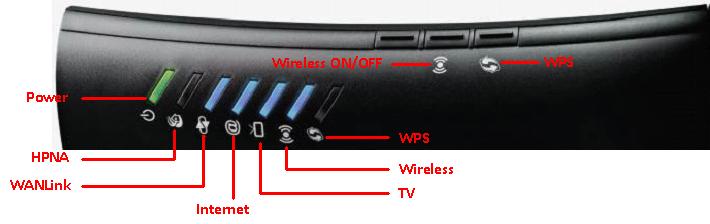
The picture below shows a Connection Hub that is working properly. The charts tell you what each light means, and what each button does.
Lights
|
Icon |
Function |
Colour and description |
|
|
Power |
|
|
|
HPNA Indicates the Bell Fibe™ TV connection |
|
 |
WAN link Indicates the modem's connection to the Bell network |
|
|
|
Internet Indicates whether you have Internet connectivity |
|
|
|
TV Indicates your Bell Fibe™ TV service status |
|
|
|
Wireless Indicates the state of your primary wireless network |
|
|
|
Wi-Fi Protected Setup (WPS) Indicates connection of devices to the wireless network |
|


Buttons
|
Button Icon |
Function |
Description |
|
|
Wireless on/off |
The "wireless" light will indicate whether your primary wireless network is on or off. Learn more about wireless connections. Press and hold this button for 8-10 seconds to completely disable or enable your wireless network. |
|
|
Wi-Fi Protected Setup (WPS) |
With Wi-Fi Protected Setup (WPS), you can securely connect your wireless devices to your wireless network with the push of a button. Press and hold this button until the WPS light starts flashing. Then, press the WPS button on the device you are trying to connect within 2 minutes. Learn more about Wi-Fi Protected Setup. |


.png)