How to scan for mobile networks on my Nubia/ZTE tablet
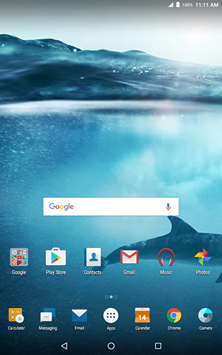
Step 1 of 8
Touch Apps.

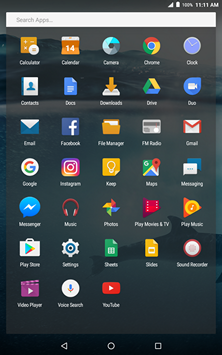
Step 2 of 8
Touch Settings.
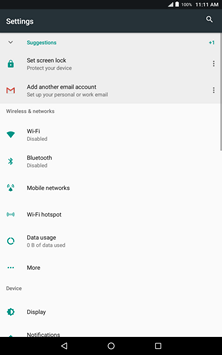
Step 3 of 8
Touch Mobile networks.
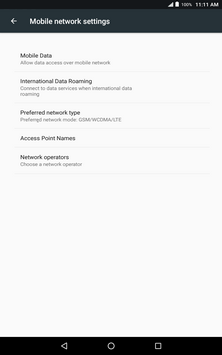
Step 4 of 8
Touch Network operators.
Step 5 of 8
Touch Search networks.
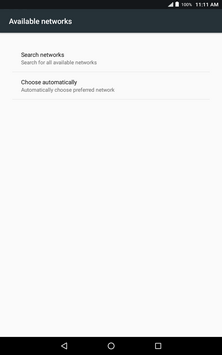
Step 6 of 8
Wait while the tablet searches for networks.
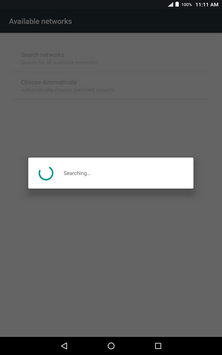
Step 7 of 8
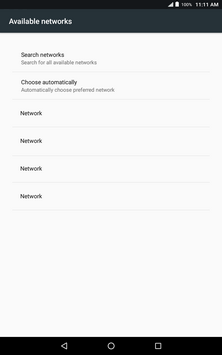
The available networks will be listed.
Select the network you want to use.
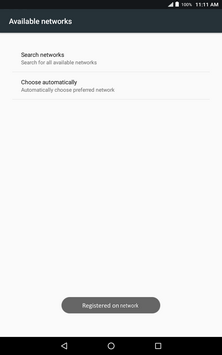
Step 8 of 8
The tablet is now connected to the mobile network.
- Touch Apps.
- Touch Settings.
- Touch Mobile networks.
- Touch Network operators.
- Touch Search networks.
- Wait while the tablet searches for networks.
- The available networks will be listed.
Select the network you want to use. - The tablet is now connected to the mobile network.
Applicable to:
Nubia/ZTE Grand X View, Grand X View 2, Grand X View 3.