I cannot find a specific channel on my Bell Satellite TV
Learn how to find missing channels on Satellite TV

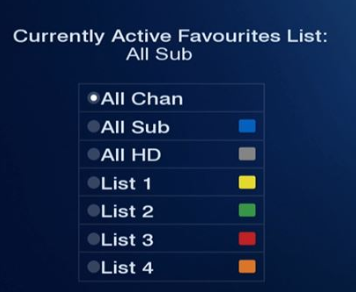
Some channels may not be visible if you have selected a different Favourites list than the one named All Chan (All channels).
To display all the channels, press the GUIDE button repeatedly on your Bell Satellite TV remote control until All Chan appears on the TV screen.
If the channel still does not appear (or appears but is inaccessible) and you’re absolutely sure that you have a subscription to the channel, try the following to refresh your receiver’s channel listing.
- Reset your receiver:
Push and hold the POWER button on the front panel for five seconds. When TV service returns, try tuning in to the channel again. - Synchronize your programming:
If the channel fails to return after resetting your receiver, you can synchronize your programming.
Once you have completed the reactivation process, it takes an average of 15 minutes before you can view or record programming. In some cases, it may take up to two hours. While this is taking place, you may see an error message on your TV screen.
Not sure if you’re subscribed to this channel?
Review all of the channels you are currently subscribed to or use our online tool to easily find all of your favourite channels.
.png)